
There are few things more panic inducing than landing in Costa Rica and realizing you can’t load Google Maps or message your Airbnb host. That vacation vibe and “pura vida” feeling can turn into panic….fast. That’s where it becomes so important to stay connected in Costa Rica.
Between navigating unfamiliar roads, booking last-minute tours, and sharing all those beach photos, having reliable data here makes life so much easier.
The good news? Staying connected in Costa Rica is now simple, and we’ve got all details for you.
We’ve been living in Costa Rica since 2016 and have tested every option (eSIMs, local SIMs, and even car-rental WiFi hotspots) while exploring every corner of the country. Over the years, we’ve also helped countless family members, friends, and readers figure out the easiest (and most affordable) ways to stay online during their visits.
In this guide, we’ll break down all your options, what actually works well here, what’s not worth the hassle, and how to pick the setup that fits your trip best.

Best Ways to Stay Connected at a Glance
- #1: Purchase an eSIM. We suggest Airalo. (Use code NEWTOAIRALO15 at checkout to save 15%)
- #2: Use an international plan from your cell service provider
- #3: Rent a WIFI hot spot from Adobe Rent-a-Car
- #4: Purchase a local SIM card once in Costa Rica
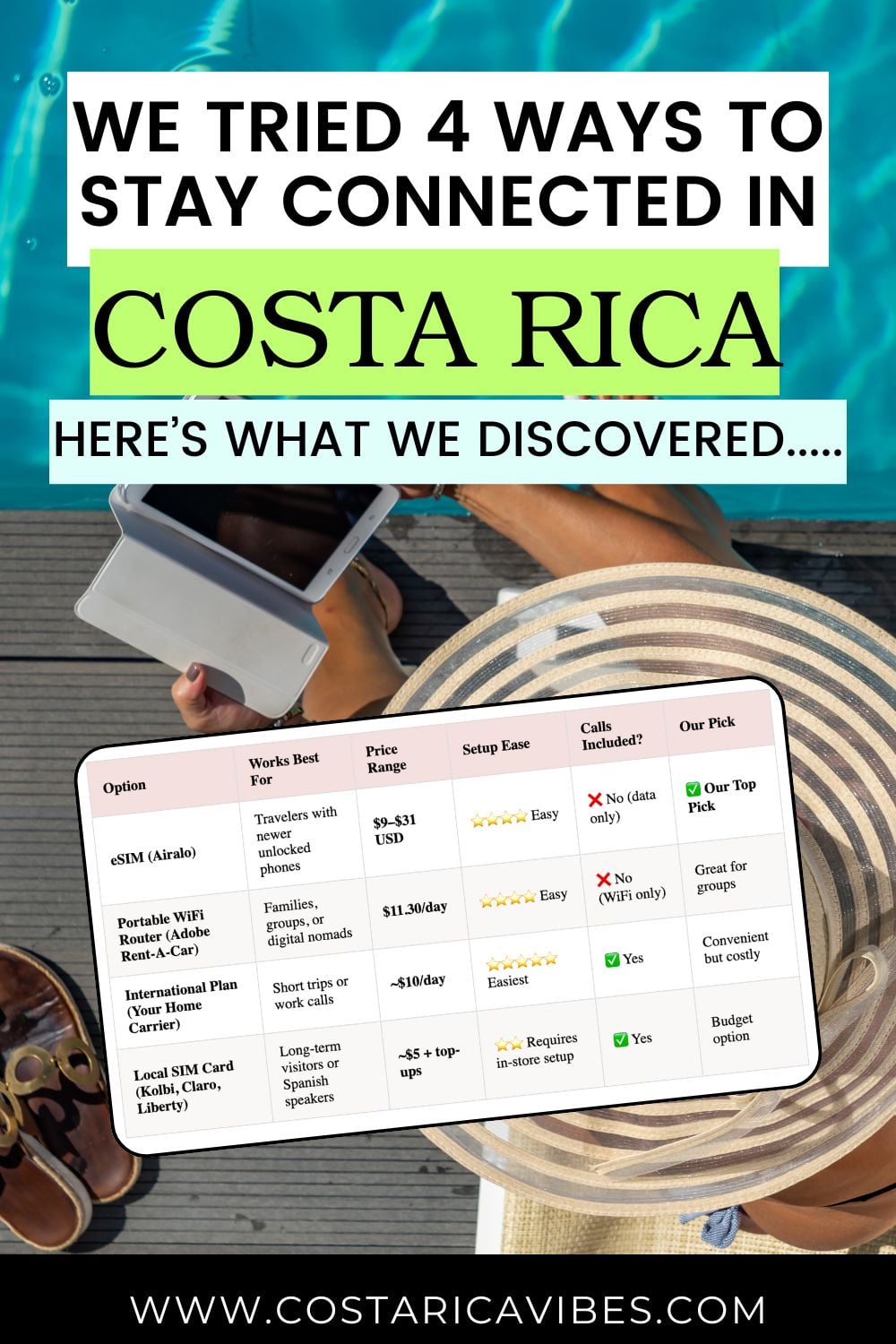
| Option | Works Best For | Price Range | Setup Ease | Calls Included? | Our Pick |
|---|---|---|---|---|---|
| eSIM (Airalo) | Travelers with newer unlocked phones | $9–$31 USD | ⭐⭐⭐⭐ Easy | No (data only) | ✅ Our Top Pick |
| Portable WiFi Router (Adobe Rent-A-Car) | Families, groups, or digital nomads | $11.30/day | ⭐⭐⭐⭐ Easy | No (WiFi only) | Great for groups |
| International Plan (Your Home Carrier) | Short trips or work calls | ~$10/day | ⭐⭐⭐⭐⭐ Easiest | Yes | Convenient but costly |
| Local SIM Card (Kolbi, Claro, Liberty) | Long-term visitors or Spanish speakers | ~$5 + top-ups | ⭐⭐ Requires in-store setup | Yes | Budget option |
Use an eSIM Card
This is Our #1 Choice to Stay Connected in Costa Rica
What is an eSIM Card?
An eSIM is simply a digital SIM card you download directly to your phone. That means no tiny plastic card, no store visits, and no swapping anything out. You can purchase and activate your plan right from your phone before your flight, and your data will connect automatically once you arrive.
We’ve tested eSIMs all over Costa Rica and have had excellent coverage and speeds. When family or friends visit, this is always the option we suggest because it saves the airport chaos and just… works.
💡 Traveler Tip: We recommend Airalo eSIM. It connects instantly to Costa Rica’s main networks (through Liberty Mobile), giving you the same great coverage you’d get from a local Costa Rican SIM, but without the hassle of visiting a store, waiting in line, or trying to communicate in Spanish. Use code NEWTOAIRALO15 for 15% off your first purchase over $10.
What Makes eSIMs So Convenient
- Set everything up before your flight, so your phone connects as soon as you land.
- Completely digital setup. Just download the Airalo app and follow the prompts.
- Connects to Liberty’s local Costa Rica network, meaning strong, reliable coverage nationwide.
How to Set It Up
- Step 1: Click here to purchase an eSIM for Costa Rica through Airalo (Use code NEWTOAIRALO15 at checkout to save 15% as a new customer on purchases over $10).
- Step 2: Choose your destination and package
- Step 3: Install your eSIM
- Step 4: Activate your eSIM once you land in Costa Rica.
- And that is it! You will be connected to data from the local networks and can start your vacation!
A Few Things to Know
- Your phone needs to be unlocked and eSIM-compatible (most iPhone 11 and newer, or Samsung S20+ and newer).
- eSIMs are data-only. You won’t get a local phone number. For calls, use WhatsApp, FaceTime, or Messenger.
- If you have a U.S.-purchased iPhone 14 or newer, your phone doesn’t support physical SIMs, so an eSIM is your only local SIM option in Costa Rica.
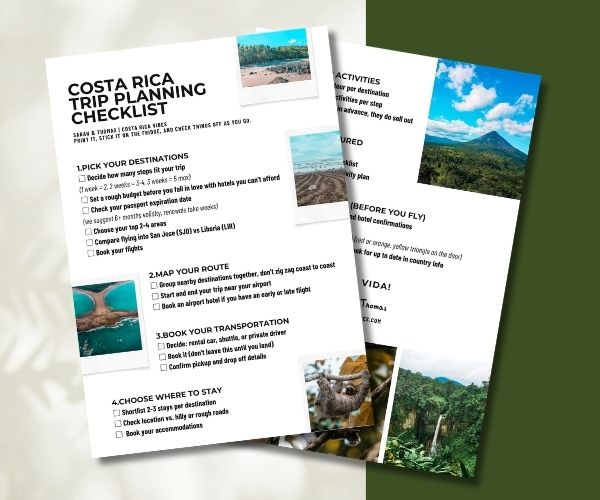
Planning a trip to Costa Rica? We’ll walk you through it step by step
Sign up now & get your free trip planning checklist instantly.
The travel data usage starts from the date of activation. In other words, we suggest purchasing the eSIM ahead of time. But, wait to activate it until just before you arrive in Costa Rica.
You can add more data anytime within the app, and Airalo will send a reminder when you’re running low.
💡 Traveler Tip: If you’ll also be traveling through other parts of Central or South America, go for the Latin America regional eSIM, which covers 19 countries. It’s perfect if you’re continuing on to Panama, Colombia, or beyond.
How to Check If Your Phone is Unlocked for an eSIM
You will not be able to use an eSIM card if your cell phone is blocked by your service carrier.
For example, if you purchased your cell phone directly from your service provider and received a discount for your new phone, it may be locked.
You can check if you have an unlocked phone by….
On Iphone
- Go to Settings
- Tap General > About
- Scroll to “Carrier Lock” or “Network Provider Lock”
- If your iPhone is locked, you’ll see the name of your carrier
- If your iPhone is unlocked, you’ll see “No SIM restrictions”
On Samsung
On Android devices, this is not as easy to check. The best way is to manually remove your SIM card and replace it with another one.
See if your phone registers the change and allows you to use the new SIM. Then you know it is unlocked.
You can always check with your normal cell phone service provider if you are unsure.
Check If Your Phone is Compatible with eSIM
Additionally, you need to check if your phone is new enough to support E-SIM.
With the Iphone, Iphone 11 and newer are all E-SIM compatible.
You can double-check on your phone by:
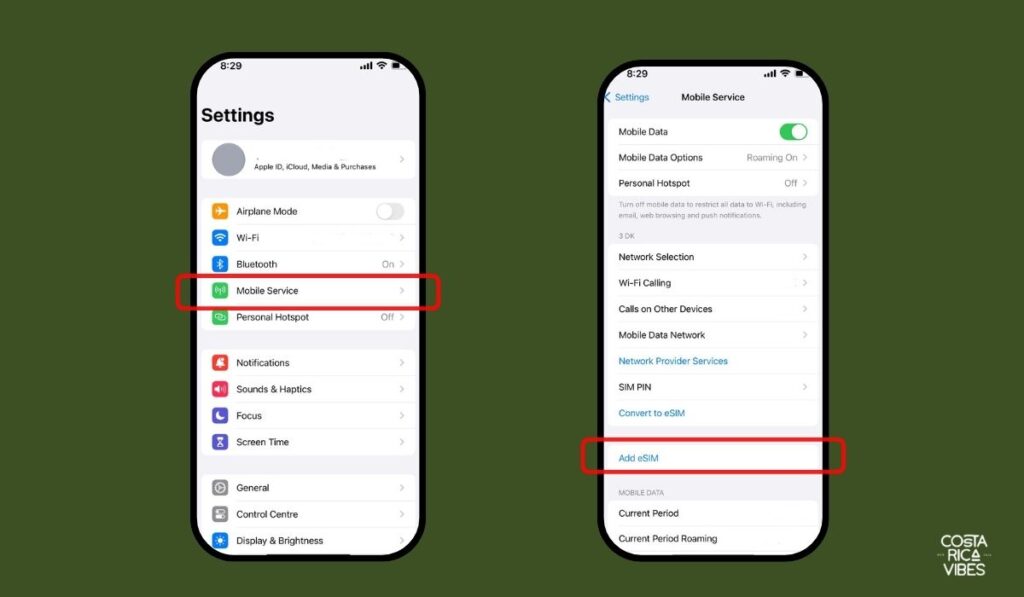
Scroll to see if you have an option to Add eSIM. This means your phone is compatible.
Go to Settings
Click Mobile Services
With Samsung, the S20 and newer all support eSIM.
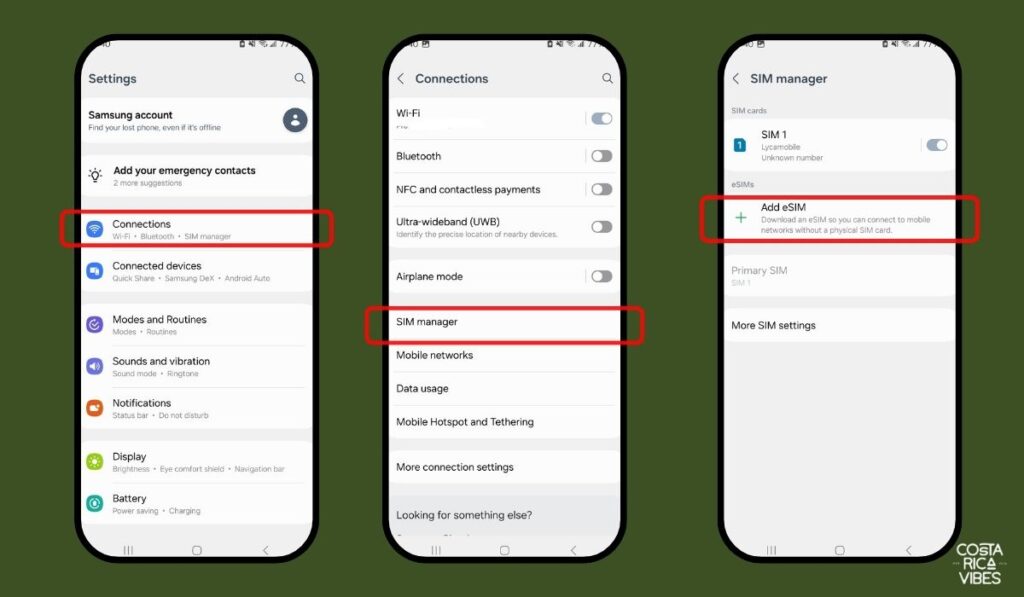
You can double-check on your phone by:
See if there is an option to Add eSIM. If yes, your phone is compatible.
Go to Settings
Click Connections
Click SIM Manager
Which Airalo Plan to Choose?
Airalo offers a few different eSIM plans for you to choose from.
For Costa Rica in 2025 these plans are:
- $9.50 USD for 1 GB data for 7 days
- $15 USD for 2 GB data for 15 days
- $20 USD for 3 GB data for 30 days
- $30 USD 5 GB data for 30 days
📞 Purchase an eSIM card for your Costa Rica travels from Airalo 📱
Use code NEWTOAIRALO15 at checkout to save 15% as a new customer on purchases over $10!
Already a customer? Use the code AIRALOESIM10 for a 10% discount
Our Experience Using an eSIM
I’ve become a complete eSIM fangirl over the past few years.
Honestly, I didn’t even know this was a thing until around 2021, when a reader traveling to Costa Rica emailed me asking for advice about eSIMs.
I tried it soon after, and now I use Airalo every time I travel internationally. I’ve used it in the U.S. and all across Europe, and it’s never let me down.
So when I recommend it here, just know it’s something I genuinely use and love.
Portable WIFI Router from Adobe-Rent-a-Car
We work exclusively with Adobe Rent-a-Car for car rental in Costa Rica. Rent through us and you will save 10% plus get many other perks.
Adobe offers portable WIFI router rentals for the length of your car rental. This costs $11.30 per day and includes unlimited data.
If you book through us you will only need to pay for the first 10 days of router rental. Any additional days are free.
This router can be removed from the vehicle. It is small enough that you can easily carry it in your purse or backpack. In our experience, it has very good service throughout the country.
This works as any WIFI would. All you need to do is connect to your designated WIFI network from any of your devices and you are good to go!
Travel Tip: Just make sure you put your phone in Airplane Mode if you use this so that you don’t get charged roaming fees from your cell phone service provider.
Pros
- If you are traveling as a family or group, this can be very cost-effective because you can all virtually connect to the router. At $11.30 a day this will likely be cheaper than using the data from an Airalo eSIM.
- If you need to work and need a reliable WIFI service while traveling, this can be a good option.
Cons
- It is WIFI, so it doesn’t have cell phone service. In other words, you can not make regular calls or send text messages. You will need to use an app like WhatsApp for calls or texts.
- You will need to charge the router as the battery drains. A charging cord comes with the device.
- Getting an eSIM is usually more cost-effective unless you plan on using a lot of data.
- You will need to rent a car from Adobe in order to reserve the router. If you plan on using g a different mode of transportation this will not be an option for you.
How to Add the Router to Your Car Rental
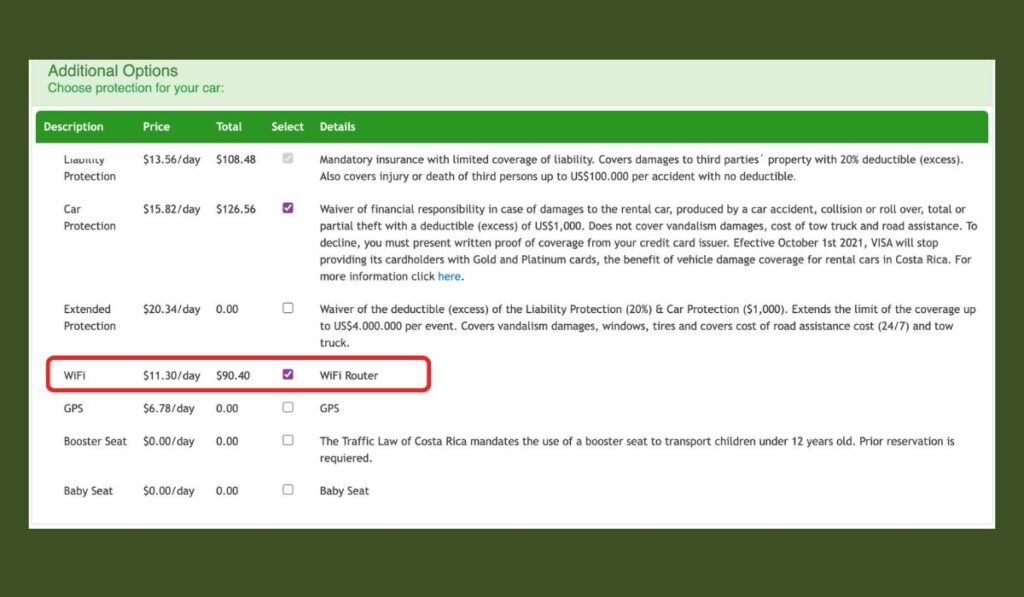
- Step One: Click here to get to our Adobe Car Rental discount page.
- Step Two: Read through everything and fill in the booking widget to select dates and car.
- Step Three: Select to add on the WIFI router in “Additional Option
- Step Four: When you pick up your rental car the Adobe employee will see that you opted to add on the WIFI router. They will explain to you how it works and you can start your journey with great service!
Rent Your Car from Adobe and Save 10% Plus Reserve Your Hot Spot
Use an International Plan from Your Cell Phone Provider
Your cell phone service provider from home may have an international plan option.
For example, I know that Verizon offers the option to use your regular cell phone plan at about an additional $10 per day while traveling (check this though, it could vary by plan).
With Verizon, there is usually nothing you need to pre-purchase. As long as you leave your phone off of airplane mode and don’t use a different SIM card you will be able to use this option and will be charged the additional fees at the end of the month.
Of course, this will vary by cell phone company and plan.
There is a chance that your mobile phone service provider does not offer any coverage options in Costa Rica. Or, you might be charged high roaming fees.
It is best to call your cell phone provider to check if you are interested in this option. If you call your provider also check about making international calls. If you will need to call your home country often this may be expensive.
Pros
- Easy to set up. You likely won’t have to do anything additional.
- You can use your regular cell phone number. This is important if you have a job in which you always need to be reachable by phone.
- You can make phone calls and send text messages
Cons
- This can be a lot more expensive than using an eSIM or local SIM card.
- Some providers don’t offer this service and you may be charged expensive roaming fees.
Buying a SIM Card in Costa Rica
It is possible to buy a local Costa Rican SIM card from one of the many cell phone service providers in Costa Rica. This is a physical SIM card rather than eSIM.
In the past, this was what we suggested to people traveling to Costa Rica. However, so many people have had issues making this work, even with unlocked phones.
This especially seems to apply to people with cell phones from the United States.
Also, all providers in Costa Rica only sell regular SIM cards, not eSIM at this time. If you have an iPhone 14 or newer purchased from the United States you will not be able to use a physical SIM card because your phone is only eSIM compatible.
So, we no longer strongly suggest this.
Reason Why We Do Not Suggest Buying a Local SIM Card
- You will need to have an unlocked cell phone for this option to work. Please refer above to the eSIM section for how to check if your phone is unlocked.
- You will need to drive to the store of a provider and there are sometimes long lines to get a SIM card.
- If you do not speak Spanish this can be difficult to navigate setting up.
- Sometimes even after that, it just doesn’t work. For example, my aunt visited and had an unlocked Samsung phone. She bought a SIM card from Kolbi and she would get text messages 5 or 6 hours after we sent them.
Despite my saying that I don’t suggest this, as people living in Costa Rica we use a prepaid phone plan from Kolbi and rarely have issues.
However, we both have unlocked phones and are proficient in Spanish for purchasing top-up cards.
Where to Purchase a Local Costa Rica SIM Card
The three main cell phone service companies you will see in Costa Rica are Kolbi, Claro, and Liberty (previously called Movistar). We use Kolbi and find that their service is very good throughout the country.
At Juan Santamaria International Airport (SJO) in San Jose: There is a Claro stand at the San Jose Airport in the baggage claim area. It is also possible to buy a SIM card from a vending machine here. However, I have heard that it is a bit complicated to do the registration yourself.
Additionally, you can drive to the nearest Kolbi, Claro, or Liberty stores. There is a store for all three in the Alajuela City Mall, which is a 5 minute drive from the airport.
At the Liberia International Airport (LIR): There are no cell phone stores at the Liberia International Airport you will need to drive to the local Kolbi Store, Claro store, or Liberty store to purchase a SIM card. These are all located in the downtown area of Liberia.
The Prepaid Plans
The plan options from each company are constantly changing. So, we suggest checking them out on your own to see which one most appeals to you.
Process of Purchasing the SIM Card and Data
At the cell phone company shop you might first need to wait in line or get a number and then wait for your number to be called.
Once you speak to an employee, you will be asked for your passport. The employee will then set up a pre-paid account for you. They need your passport because it is required that you are registered in the central system.
Make sure you opt for a pre-paid account and not an actual plan!
There is typically a fee of about $5 to set up the pre-paid SIM card, but this is then usually added as a credit to your account.
Most places take credit card, but I suggest paying in cash if possible. That way you can rest assured that you signed up for a prepaid account and won’t be billed for something monthly.
They should accept US dollars and Costa Rican colones (the local currency), but it is always best to have some colones on you.
The employee will then put the SIM card into your phone for you and you are good to go!
Note: Sometimes things can take forever in Costa Rica. Last time I needed a new SIM card I waited for 40 minutes in line at the Kolbi store in San Jose. Ugh!
We can usually take a four-hour drive and use our phone for Spotify and Waze for directions and spend about $1 to $2 worth of data.
How to Add Money to Your SIM Card
To add money to your account you can buy recharge cards at many convenience stores throughout the country. You will need to ask for them at the counter.
You will need to say what amount you would like. The cards are often sold in denominations of 1,000 CRC, 2,500 CRC, 5,000 CRC, and 10,000 CRC.
Once you purchase the card, you will need to scratch off the code on the back of the card and follow the instructions to top up your amount.
Additionally, now most of the companies make it possible for you to top up your balance online.
Why Should I Buy a Local SIM instead of an eSIM?
The only reason I would purchase a local SIM card instead of an eSIM card is if you will need to make local calls within Costa Rica.
However, even with an eSIM this shouldn’t be a problem because almost everyone in this country uses WhatsApp. Even restaurants often have a Whatsapp call number (I know….it’s weird).
Also, a local SIM card comes out to be a bit cheaper than an eSIM. But, with the stress of setting it up, I just don’t think it is worth it.
Using Your Cell Phone for Directions in Costa Rica
- For directions on your phone, the best app here is the free app Waze. It is the most commonly used direction app in the country. We love it because other drivers can and do mark obstructions or delays on the road. For example, if there is a truck stopped on the road, Waze will usually notify you about .5 miles before you come to the obstruction.
- If you will not have a data plan while in Costa Rica, don’t forget to download offline Google Maps to get around. Google Maps is not always the best here, but it is a great free option.
For more about getting around, we have a full guide to getting driving directions in Costa Rica.
Our Cell Phone Usage Tips for Costa Rica
- Don’t forget to put your phone on airplane mode if you do not have a Costa Rica SIM card or an international plan. If you don’t put it on airplane mode you could end up with crazy charges even if you don’t use it. Things like automatically receiving text messages will cost a lot of money due to international roaming.
- If you are in an emergency, the emergency number here is 9-1-1. You can call 9-1-1 without a cell phone plan or SIM card.
- If you need to call your family or friends back home it is cheapest to use data and connect through social media, WhatsApp, or Facebook Messenger.
- XE Currency Exchange is a free app that is so helpful when trying to understand currency conversions. I still use it all the time to figure out a price in USD versus Costa Rican colones.
- Don’t forget to purchase travel insurance for Costa Rica. This helps be reimbursed for illnesses, delayed or canceled travel plans, lost luggage, stolen mobile phones etc. We like Heymondo. You can get a quote from them here.
- We suggest bringing a power bank so that you can always be assured that your phone is charged.
- Outlets in Costa Rica are the same as in the United States. If you are traveling from Europe, you will need to bring a converter.
- If you want to listen to music from your cell phone while in the car, don’t forget to pack an auxiliary cord.
- There is free wifi at the airport if you need it. Also, wifi in Costa Rica is very prevalent. Almost every hotel and some restaurants have free wifi for customers to use.
- The cell phone service in Costa Rica is pretty good in most spots. They have 4G throughout the country. You may occasionally hit dead zones, but that usually only happens in very remote areas.
- Everything gets wet here. We highly suggest buying a waterproof case or buying one of these cell phone dry bags for while on the beach or hiking during rainy season.
- And the most important tip, don’t forget you’re on vacation. Ignore all those emails from your boss. Post those nice Costa Rican pictures to Instagram when you return. Just relax and live up the pura vida lifestyle! 🙂
📞 Purchase an eSIM card for your Costa Rica travels from Airalo 📱
Use code NEWTOAIRALO15 at checkout to save 15% as a new customer on purchases over $10!
Already a customer? Use the code AIRALOESIM10 for a 10% discount
Conclusion: Costa Rica SIM Card
In conclusion, an eSIM card is our favorite way to stay connected while traveling in Costa Rica. This is typically the most economical solution that also provides good coverage and is easy to set up.
If you have any questions about the best SIM card option for your travels in Costa Rica, don’t hesitate to leave them in the comment section below. We are always happy to help you out!
You Might Also Like:
🌴 Plan Smarter, Travel Easier
Before you go, here are the tools we personally use for every Costa Rica trip:
🚗 Should I rent a car in Costa Rica?
Having your own car gives you the most flexibility to explore beaches, volcanoes, and waterfalls at your own pace.
- Save 10% Plus Other Perks with Our Adobe Rental Car Discount
- You might also consider; shared or private shuttle services
🏄🏽 How can I book tours and activities?
We love Viator for its wide selection, verified reviews, and free cancellation on most tours.
🍍 I’m overwhelmed with planning. Can you help?
No worries! We’ve got you! You can:
- 📧 Sign up for our email list (we walk you through the planning process step-by-step)
- 🗺️ Visit our Start Here Page for planning guidance.
- 💼 Check out our ready-made Costa Rica itinerary for the perfect one-week trip plan
- 🤖 Try Slothy, our free AI trip planner, for a personalized route with hotel and destination suggestions.
✈️ What is the best way to book a flight?
Use Skyscanner to compare flights into both San José (SJO) and Liberia (LIR).
🛏️ What is the best way to book my Costa Rica hotels?
We like Booking.com for hotel bookings and VRBO for private villas and vacation homes.
🗣️What is the main language in Costa Rica?
The main language in Costa Rica is Spanish. Most people working in tourism speak at least some English.
💰 What is the currency in Costa Rica?
The currency used in Costa Rica is the Costa Rican colón (CRC). However, the US dollar is widely accepted in most tourist areas
📞 What is the best way to stay connected?
An eSIM from Airalo is the easiest way to get instant 4G data when you land. No kiosk or SIM swap required.
🌴 Is Costa Rica safe?
Generally, Costa Rica is considered safe for tourists. However, like any travel destination, it’s best to use caution and be aware of your surroundings.
🛂 Do you need a passport to go to Costa Rica?
Yes, Costa Rica is its own country. You will need a passport to visit.

Sarah McArthur
Sarah is the co-founder and main writer of Costa Rica Vibes. Originally from the US, she has lived in San José, Costa Rica since 2016 with her husband Thomas, who takes the photos you see on this site.
Together they have been writing about Costa Rica since 2017, drawing on years of road trips, hotel stays, and tours in every region of the country.
Read more about Sarah
Sarah McArthur
Sarah is the co-founder and main writer of Costa Rica Vibes. Originally from the US, she has lived in San José, Costa Rica since 2016 with her husband Thomas, who takes the photos you see on this site.
Together they have been writing about Costa Rica since 2017, drawing on years of road trips, hotel stays, and tours in every region of the country.
Read more about Sarah